



Cut Your Fabric MCP Costs: Why I Switched from GitHub Copilot to Claude Code
by Ginger Grant | July 1, 2026
Since GitHub Copilot changed their pricing on June 1st moving to metered token pricing, I have been investigating methods for using AI with Fabric using other tools. One method that I have been investigating is using Claude Code. After testing out its feature and functionality with Fabric MCP, I have determined that it is easier to configure and cheaper to run than VS Code. It does require using Git repos to deploy the code to Fabric, but since I am not using Azure DevOps with Fabric, this limitation was not an impediment to me. The pricing models for both are confusing, but I have compared the relevant elements for both methods.
| Criteria | VS Code | Claude Code |
|---|---|---|
| Uses Fabric Capacity CU | Yes | No |
| Token cost for Pro | $10 for 1,000 AI Credits, .01 per credit after that | $17 (billed yearly, or $20 if billed month to month). Roughly 44,000 every 5 hours with variations based on peak times |
| Models | Auto (picking your own model is more expensive) | Opus, Sonnet or Haiku |
| Updates Fabric Directly | Yes, using the Fabric Data Engineering Extension | No. Moves code with Git repo pushes |
| Number of things you must install to get it to work | 9 | 4 |
There’s a lot required to set up both, which I detail in this article. Getting Fabric Data Engineering Extension to work in VS Code is very complex and involves modifying your path in addition to getting things installed, which can be somewhat difficult. Comparatively, getting everything working in Claude was a lot easier, and I can get a lot more AI assistance, so it proved to be a wiser choice.
MCP Servers
MCP servers are an AI tool that can really live up to the promise of improving productivity since they connect large language models directly to features and functionality the product team has already built. There are many MCP servers available including ones for Azure, MS Learn, Fabric and Power BI. For more information on MCP servers in general, please read my last blog where I introduced the topic. In this blog I’ll dive further into the topic of MCP servers and I’ll discuss how to configure your environment to use the MCP server for Microsoft Fabric. MCP servers are meant to provide agentic solutions for questions you may pose to them, and you will need an application which interfaces with the MCP server and your code to make that work. Two examples of applications which you can use with MCP servers are VS Code (with the GitHub Copilot extension installed) and Claude Desktop.
Looking Beyond VS Code for MCP Server Interface
As I mentioned above, the recent pricing changes in Github Copilot on June 1, 2026 motivated me to explore low-cost methods for using AI. Claude Desktop is a free tool created by Anthropic, the makers of Claude LLM. Claude's pricing uses usage-based tiers—Free, Pro, and Max—similar to GitHub Copilot's model prior to that date. Since the June1 change, Github Copilot usage is metered based on the number of tokens used. The integration between Claude Desktop and VS Code with Github Copliot is looser, which means you may have to do some copying, but it is possible to get answers with lower cost. For this reason, you may be interested in using both, switching back and forth to the one with the most available credits.
VS Code and Fabric MCP Server Setup
To set up the Fabric MCP server in GitHub Copilot, you need to have installed the Fabric Engineering Extension first, which requires the Jupyter extension, and installing Python 3.11, Miniconda and Java JDK. The Fabric MCP Server requires you to install the Azure CLI on Windows as well. Next you must install the Fabric MCP Server extension. Once installed, the extension remains inactive until it's started. This happens either automatically, when GitHub Copilot prompts you with a request, or manually. To start it manually, open the command palette (Ctrl+Shift+P) and select MCP: List Servers. You will then see a list of all the MCP servers loaded (Figure 1). The servers will not run until started, which you can do by highlighting the server’s name and selecting Start Server in the dropdown box which appears when you do that.
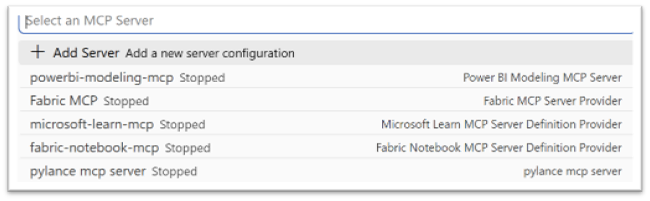
Figure 1: A list of MCP servers that you could start.
Once the Fabric MCP Server is running, within the prompt for GitHub Copilot you can complete tasks which can be performed using the Fabric MCP, such as creating and configuring a lakehouse and other tasks which can be performed using the Fabric API, the primary source of the content of the MCP server. When using the Fabric Data Engineering extension, which is a prerequisite to use Fabric MCP Server, you will need to be logged into your Fabric tenant. The security that you have in the Fabric tenant is applied to the code you can implement in the MCP server. For example, you only have access to the workspaces where you have been granted access in Fabric and cannot access data not shared with you.
Claude Desktop Setup
To set up Claude Desktop to use the Fabric MCP Server, you need to go to Settings then Connectors and Add custom connector, enter a name and the URL https://mcp.api.fabric.so/mcp, then follow the OAuth prompt.
If you want Claude Desktop to be able to modify your code, which requires enabling Claude Code, you will have to move beyond the free tier of Claude and pay $20 per month. You can save if you choose the annual $200 Pro plan, which brings the cost down to $17 per month. This plan also allows you to use the more advanced Anthropic models, like Opus and Haiku, rather than just the lower cost Sonnet. You will also need to configure a working local sub-directory where you want the code to live. You can see that in the lower part of Figure 2.
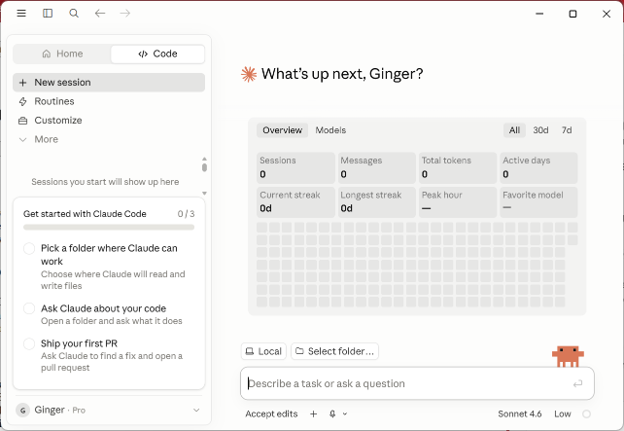
Figure 2: Claude Desktop, where you can select a folder where Claude Code can work.
Claude Code Requirements
Claude Code is designed to work directly with GitHub repositories, which means that Git for Windows is required to run local sessions. If it is already installed, set the CLAUDE_CODE_GIT_BASH_PATH environment variable to the full path of bash.exe and restart the app or switch to a remote environment. This differs from how VS Code works as it does not require that a workspace has any source control. You will be using pull requests to push code to the Fabric tenant workspace rather than just interfacing directly with workspaces as VS Code does. To modify your code, you will need to first deploy it locally to the directory referenced in Claude Code, and then it can access everything.
Which Tool to Use for Fabric MCP Server
Setting up VS Code for Fabric Data Engineering, a prerequisite for using the MCP Server, can be rather challenging. But once it is configured, adding Azure CLI and the Fabric MCP server is easy, and the tight integration lets you edit code locally and then deploy straight to your Fabric tenant. When using VS Code with Fabric, you do access the Fabric tenant, which means that running your code will increase your Fabric CU usage. The VS Code GitHub license is on top of that, and depending on what you are doing, that bill can be steep.
By comparison, while Claude Code is more loosely integrated and relies on git for the deployment of code, it does not use Fabric CUs when running the code and it uses a fixed price model for interfacing with the Fabric MCP Server. The setup also has fewer steps. To be honest, I would not have looked at this solution prior to June 1, but since I have, I am impressed with the results, and the cost appears to justify the additional effort involved. One other consideration is that Claude’s models, specifically the Claude Opus 4.8 and 4.7 models, are constantly among the most highly rated models for coding and you are free to use them with Claude Code. With VS Code, Microsoft will pick the most optimal model for your available token resources. You can choose Claude Opus instead, but doing so will delete your resources rapidly. Code quality is the other reason that, if I am using Fabric MCP Server, I prefer to use Claude Code.